
Andromeda's OrderPad handheld plus table-aware POS means servers stay on the floor, 订单 hit the 厨房 the moment they're taken, and tables turn faster — built for 餐厅, casual-dining chains and food-led pubs.
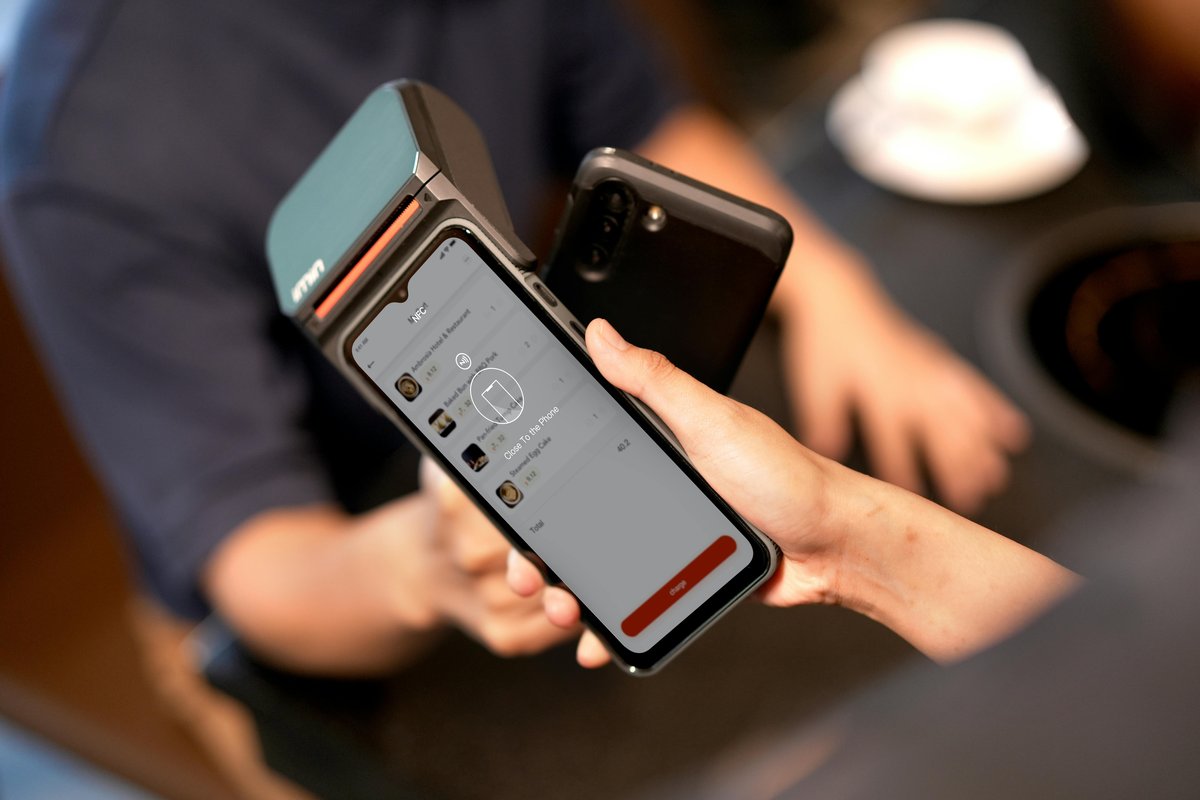
On a busy Saturday, a single server will walk to the till two hundred times. Two hundred interruptions, two hundred chances to forget a modifier, two hundred tables left without eye-contact for thirty seconds. Table ordering deletes all of that. The order goes straight from the guest's mouth to the 厨房 screen.
Starters fire on send. Mains sit on hold until the server fires the next course. Allergens flagged in amber, right where the chef and server both see them.
OrderPad puts the 菜单, modifiers, allergen flags and course timings on a handheld the server carries. The order is in front of the chef before the server has walked away from the table. Drinks go to the bar screen; food goes to the right 厨房 station; the table timer starts the second the guest sits down.
Splits, transfers, tabs and covers are one tap each. No calling the manager over. No queue at the till. No "did you hear me say no mushrooms?".

Server keys the order on the handheld. It's on the KDS before they've taken a step. Drinks, starters and mains each route to the right screen in the right moment.
Starters fire now. Mains sit on hold. Desserts tee up after mains clear. The server fires each course when the table is ready — no more cold seabass arriving while the starters are still on the table.
Allergen flags and modifier options prompt the server as the order is taken. Pulled live from the same Portal 菜单 that runs the website, kiosk and aggregators — so nothing is out of sync.
Move a cover from 12 to 14. Split a tab three ways. Merge two tabs when a group joins up. Open a bar tab and attach it to a dining table. One tap each, no manager escalation.
Every table has a clock — seated, starters in, mains fired, dessert, bill. Front-of-house managers see the whole floor at a glance and know which table needs a gentle nudge.
Drinks go to the bar screen the second they're ordered. No walking pints up from a till at the back. Pub-style service gets properly fast — and drinks sales lift with it.
Local 菜单 cache and queued-order fallback mean a brief Wi-Fi blip doesn't stop the floor. Queued 订单 send automatically the moment coverage returns.
新 starters are taking 订单 inside a single service. The handheld is a familiar Android app — not a complicated till with buried 菜单s — so there's nothing to relearn on a Friday.
| Capability | Paper pad & till | Generic tablet ordering | Andromeda OrderPad |
|---|---|---|---|
| Order lands on KDS instantly | ✗ After a walk to the till | Usually | ✓ The second it's sent |
| Course fire control | Shouted to the 厨房 | Rarely | ✓ Per-course, per-table |
| Allergens prompted at the table | Memory & luck | Plain-text note | ✓ Flagged live from Portal 菜单 |
| Same 菜单 as website, kiosk & aggregators | Separate printouts | Usually a separate system | ✓ One Portal, one source of truth |
| Splits, transfers, covers | Manager over to the till | Till only | ✓ One tap on the handheld |
| Offline / Wi-Fi-drop resilient | ✓ Paper is paper | ✗ Usually fails | ✓ Local cache & queue |
| Pay at table on the same device | ✗ | Sometimes | ✓ Integrated card reader |
"Before OrderPad, a Friday night was three servers sharing one till and the chef shouting for course timings. Now every server has the 菜单 in their hand, mains fire when the starters clear, and we're turning the back room twice instead of once. That's the difference between a good week and a great one."
Table ordering lets the server take the order at the table using a handheld device — Andromeda's OrderPad — instead of walking back to a till to key it in. The order lands on the KDS the moment it's taken, modifiers and allergens are captured in the moment the guest says them, and the server stays on the floor where the guests are.
A typical busy server makes 150 to 250 trips to a till across a shift — order in, drinks, modifiers, course changes, desserts, bill. OrderPad removes almost all of them. Servers spend the time on the floor with guests; food hits the 厨房 earlier; the table turns faster.
Yes. Allergen flags and modifier options are prompted on the handheld as the server takes the order — no memorising, no "let me just check" back at the till. The allergen list is pulled from the same Portal 菜单 that runs the website, kiosk and aggregators, so it's always in sync.
All of it, from the handheld. Split a table between two servers, move a cover from table 12 to 14 when a larger party arrives, merge two tabs when a group joins up — one tap each, no walking to a till, no calling the manager over.
No. OrderPad keeps a local cache of the 菜单 and queues 订单 if the Wi-Fi drops. As soon as coverage returns, queued 订单 are sent. In practice this is rare — Andromeda sites run dedicated 员工 Wi-Fi separate from guest Wi-Fi — but the safety net is there.
OrderPad runs on standard Android handhelds, with optional integrated card readers for pay-at-table. We can supply rugged, 餐厅-grade devices as part of implementation, or you can use suitable 硬件 you already own. We don't lock you into proprietary devices.
The other side of the same table — guests scan, order and pay from their own phone when you want the server out of the loop.
See QR order & pay →Guests scan a QR code, see the bill, split it any way and pay in under a minute — or hand the OrderPad over with a card reader built in.
See pay at table →The full-service POS behind OrderPad — tables, courses, tabs, stock, allergens and reporting across every channel in one place.
See the 餐厅 POS →订单 from OrderPad land on the right 厨房 screen, with course timing, allergen flags and elapsed timers keeping the line on-pace.
See the KDS →Book a 30-minute demo and we'll walk you through OrderPad on a floor layout like yours — with live KDS firing, allergen prompts and a full split-bill at the end of the meal.
预约演示